Patch Wednesday Day 143 - PHP2Shell (CVE-2026-109618 and CVE-2026-109619) Patch
Ashwani Paliwal
October 28, 2026
On October 21, 2026, the PHP project shipped emergency fixes for two critical flaws that the industry quickly named PHP2Shell. Chained together, they let an unauthenticated attacker run code on a PHP web server with crafted requests. On Apache with mod_php, a single request can trigger the attack before any application code runs.
What is PHP2Shell?
PHP2Shell is two memory-safety bugs in the PHP engine itself, not in a framework or plugin. That is why it hits almost every PHP site, whatever application runs on top.
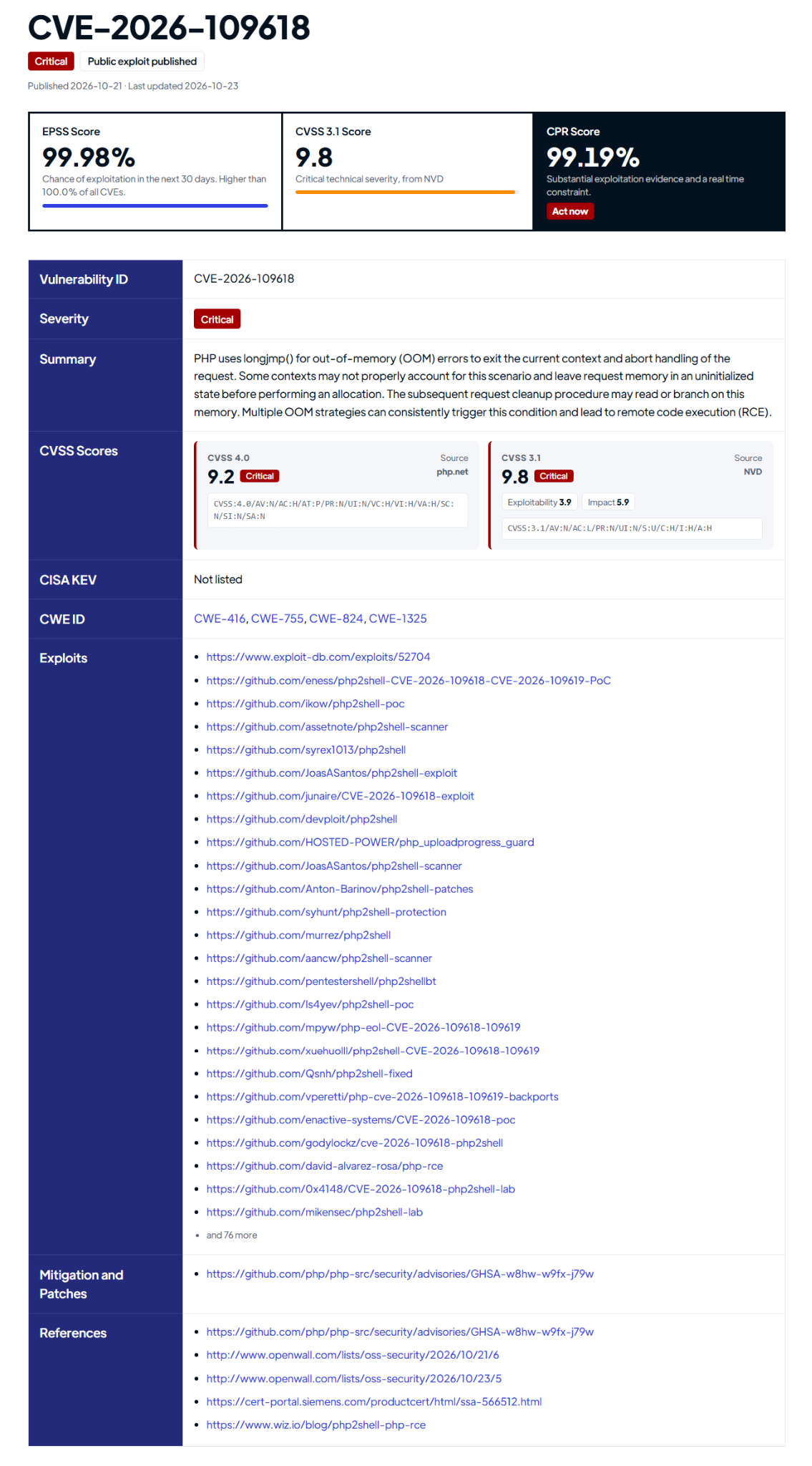
CVE-2026-109618, out-of-memory corruption: PHP aborts a request with longjmp() when it runs out of memory. Some code paths leave request memory uninitialized at that moment, and the cleanup that follows reads it as valid data.
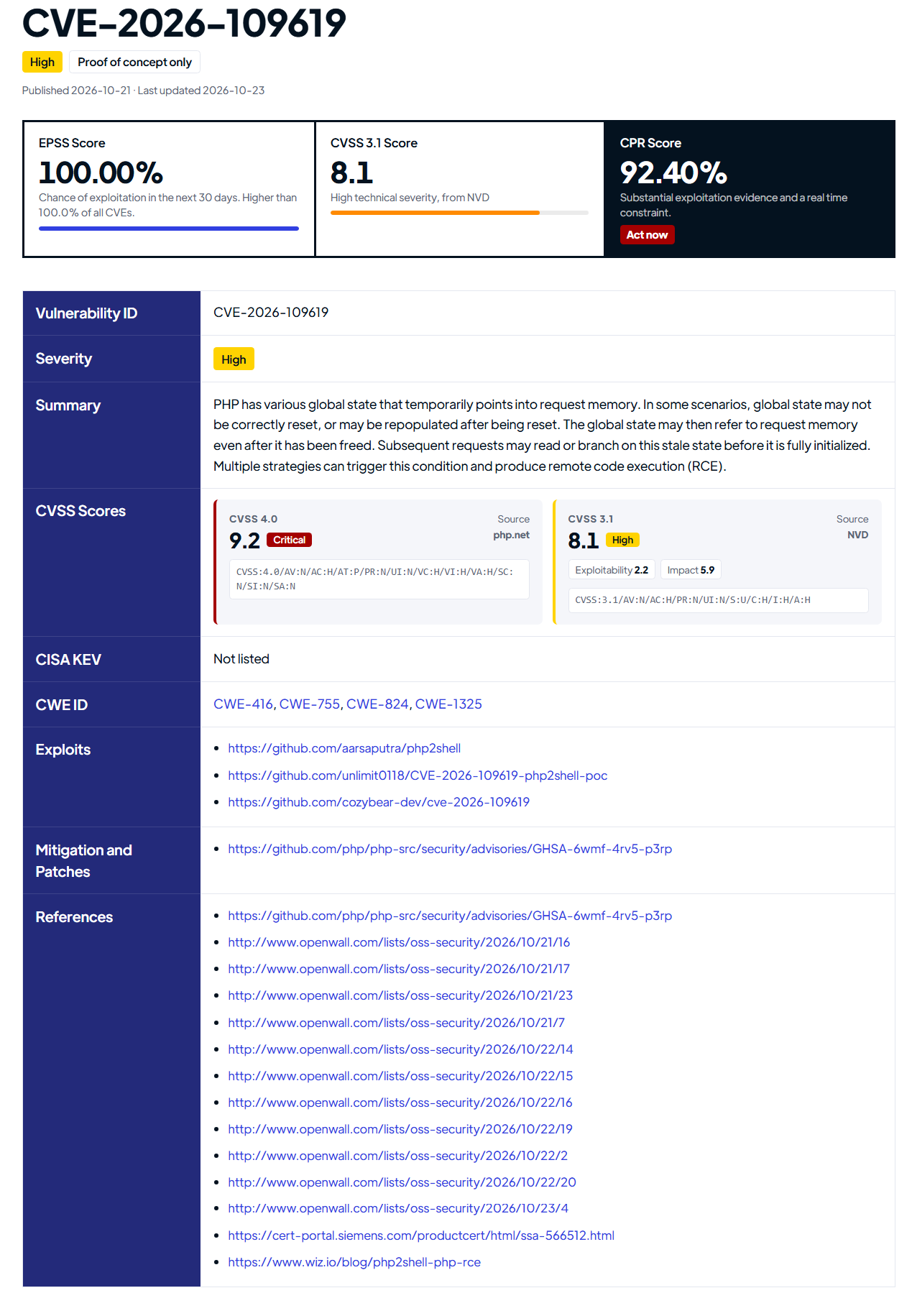
CVE-2026-109619, stale global state: PHP's global state can keep pointing at request memory after that memory is freed. A later request on the same worker can then use it, a classic use-after-free.
Why PHP2Shell matters
Reach: PHP powers 69.3% of websites whose server-side language is known. Every PHP installation that serves web requests is affected: PHP-FPM, Apache with mod_php, php-cgi, FrankenPHP and LiteSpeed. The vulnerable code goes back to PHP 5.4.0.
Exploited before the patch: Amazon's honeypots recorded an exploitation attempt on October 17, four days before the fix was public. The CVE IDs leaked on October 20, and PHP pulled its release forward by a day.
Appliances, not just websites: Palo Alto Networks confirmed that PAN-OS and Panorama are affected, and Siemens published an advisory for RUGGEDCOM APE1808.
On CISA's KEV list: CISA added both CVEs to the Known Exploited Vulnerabilities catalog on October 26, with a remediation deadline of October 29 for US federal agencies.
Vulnerability Details
Patch Deployment with SecOps Patch Management
Manual Patch deployment
If you are not on SecOps Solution yet, use either of these methods. Both install the same fixed build from Ubuntu's official repository.
Method 1: Update from the Ubuntu repository (recommended)
Refresh the package lists: sudo apt update
Confirm the fixed build is offered. The output should show 8.3.6-0ubuntu0.24.04.13: apt list --upgradable | grep php8.3
Upgrade the PHP packages: sudo apt install --only-upgrade php8.3-common php8.3-cli php8.3-opcache php8.3-readline libapache2-mod-php8.3 Add every other php8.3 package that dpkg -l | grep php8.3 lists, such as php8.3-fpm, php8.3-mysql or php8.3-curl. All php8.3 packages must move to the same version together. Running sudo apt upgrade also works, and upgrades every package with a pending update.
Restart PHP so running workers load the fixed code. Use sudo systemctl restart apache2 for Apache with mod_php, or sudo systemctl restart php8.3-fpm for PHP-FPM.
Method 2: Manual download from the Ubuntu repository
Use this for servers that can't reach the Ubuntu mirrors through apt.
Install all the downloaded packages in one command: sudo dpkg -i ./*_8.3.6-0ubuntu0.24.04.13_amd64.deb
If there are any dependency issues, resolve them with sudo apt --fix-broken install.
Restart Apache or PHP-FPM as in Method 1.
Validate the patch deployment
Run dpkg -l | grep php8.3 and verify that every php8.3 package is now at 8.3.6-0ubuntu0.24.04.13.
Run a fresh vulnerability scan to confirm both CVEs are closed.
By following these steps, you can ensure that CVE-2026-109618 and CVE-2026-109619 are mitigated on your system.
Important Note:
There are several key things to remember while deploying a patch. It is crucial to download the correct patch file that has been released for your system’s architecture, applications,Operating System, and Build Version
It is crucial that you follow the right process or supply the correct commands while installing the patch
Understand if the patch requires a reboot of the system or not. If yes make sure to perform a reboot securely to avoid system corruption
SecOps Solution is an agentless patch and vulnerability management platform that helps organizations quickly remediate security risks across operating systems and third-party applications, both on-prem and remote.

.jpg)

.jpg)


.jpg)