Patching
PM Tools
Security
How to Safely Test and Roll Out Patches Without Disrupting Production

Ashwani Paliwal
October 6, 2026


Patching is one of the most important activities in cybersecurity—but it can also be one of the riskiest.
A critical vulnerability may require immediate remediation, yet deploying a patch directly to production can introduce application failures, compatibility issues, downtime, or unexpected performance problems. This creates a difficult balance for IT and security teams: how do you fix vulnerabilities quickly without disrupting the business?
The answer is not to delay patching. It is to build a controlled, risk-based patch testing and rollout process.
In this guide, we’ll explore how organizations can safely test patches, progressively deploy them, monitor their impact, and use automation to make patch management more reliable.
A patch is designed to fix a vulnerability, bug, or security weakness. However, every production environment is different.
A patch can potentially:
The challenge becomes even greater in large environments where thousands of servers, endpoints, containers, and applications may depend on one another.
This is why "patch everything immediately" isn't always the safest strategy.
Instead, organizations need a structured approach that combines urgency, testing, automation, monitoring, and rollback capabilities.
Before testing or deploying a patch, determine which vulnerabilities actually require immediate attention.
Not every vulnerability represents the same level of risk.
Security teams should consider factors such as:
For example, a critical vulnerability affecting an internet-facing production server should generally receive more attention than a medium-severity vulnerability on an isolated development machine.
A risk-based approach helps teams answer:
Which patches should we test and deploy first?
This prevents security teams from spending valuable time treating every vulnerability as equally urgent.
Never assume that a patch will behave exactly as expected in production.
Before deployment, test it in an environment that closely resembles production.
A good test environment should replicate important characteristics such as:
The closer the test environment is to production, the more useful the results will be.
However, testing doesn't always have to mean creating an exact copy of your entire infrastructure. Organizations can use representative systems or carefully selected subsets of production infrastructure.
Once the test environment is ready, install the patch and evaluate its behavior.
Testing should go beyond simply checking whether the patch installed successfully.
Security and IT teams should verify:
A patch should be considered successful only when both the security objective and operational requirements are satisfied.
After successful testing, don't immediately deploy the patch across the entire environment.
Instead, start with a small group of systems.
This is commonly called a canary, pilot, or phased deployment.
For example:
Stage 1: Test environment
↓
Stage 2: 5% of production systems
↓
Stage 3: 20% of production systems
↓
Stage 4: 50% of production systems
↓
Stage 5: Full production deployment
The exact percentages depend on the organization's infrastructure and risk tolerance.
The purpose is simple:
Limit the blast radius if something goes wrong.
If the patch causes problems during the first production stage, the organization can stop the rollout before thousands of systems are affected.
One common mistake is deploying a patch first and deciding afterward whether it worked.
Instead, define measurable success criteria before starting.
For example:
Patch deployment success criteria:
These criteria make it easier to determine whether the deployment should continue.
Patch deployment shouldn't end when the installation finishes.
Monitoring is essential during the rollout window.
Security and IT teams should monitor:
A patch may install successfully but still cause problems several hours later.
For this reason, organizations should define a post-patch observation period before moving to the next deployment stage.
Even extensive testing cannot guarantee that a patch will behave perfectly in every production scenario.
That's why rollback planning is critical.
Before deploying, determine:
A good patch management process should make rollback as predictable as deployment.
This is much safer than continuing a deployment simply because the patch is considered "critical."
Manual patching becomes difficult to manage as infrastructure grows.
Automation can help organizations:
However, automation should not mean "patch everything automatically."
The goal should be controlled automation.
Organizations should combine automation with approval policies, deployment rings, maintenance windows, testing, and rollback procedures.
Organizations should establish standardized policies for different types of patches.
For example:
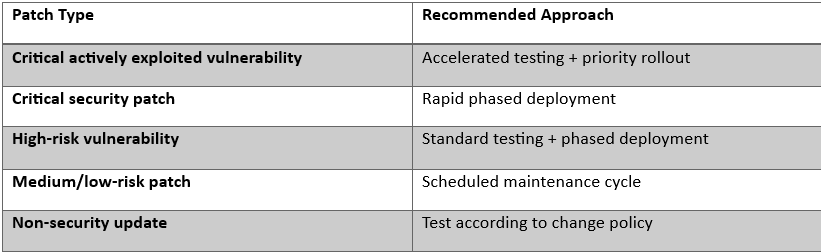
This allows teams to balance security urgency with operational stability.
Successful installation does not necessarily mean successful remediation.
After deployment, security teams should verify that:
This creates an important feedback loop:
Identify → Prioritize → Test → Deploy → Verify → Monitor
Without verification, organizations may incorrectly assume that a vulnerability has been remediated.
SecOps Solution helps organizations move beyond simply identifying vulnerabilities by bringing vulnerability management and patch management into a more structured remediation workflow.
Instead of treating patching as a one-time installation task, organizations can use SecOps Solution to support a more controlled process:
Security teams can prioritize vulnerabilities based on risk rather than treating every vulnerability equally.
Factors such as vulnerability severity, exploitability, and asset importance can help teams determine where remediation should happen first.
Organizations can use controlled deployment approaches to reduce the risk associated with pushing patches across large environments.
Testing patches on selected systems before broader rollout helps identify compatibility or operational issues earlier.
SecOps Solution supports patch deployment workflows designed to help organizations move from identification to remediation while maintaining control over the rollout.
This is especially important for organizations managing distributed infrastructure and large numbers of endpoints or servers.
One of the biggest concerns with patching is:
What happens if the patch causes a problem?
SecOps Solution's patch management capabilities include pre-validated and revertible patches, helping organizations reduce the operational risk associated with remediation.
After deployment, teams can verify whether vulnerable systems have actually been remediated rather than relying solely on patch installation status.
This helps close the loop between vulnerability detection and actual risk reduction.
Organizations can simplify the entire process into six stages:
Identify vulnerable assets and applications.
Determine which vulnerabilities require immediate remediation.
Deploy patches to representative test systems.
Roll out patches to a small production group.
Gradually increase deployment coverage while monitoring results.
Confirm successful remediation and investigate any failures.
This approach allows security teams to maintain a balance between speed and stability.
Patch management doesn't have to mean choosing between security and availability.
The real objective is to build a process where patches can be deployed quickly without unnecessarily putting production at risk.
The safest approach combines:
As organizations become more dependent on complex infrastructure, cloud environments, distributed endpoints, and business-critical applications, patching safely becomes just as important as patching quickly.
With a structured platform such as SecOps Solution, security teams can move from reactive patching to a more controlled, measurable, and risk-aware remediation strategy.
The goal isn't simply to deploy patches faster. It's to remediate vulnerabilities confidently—without turning a security fix into a production incident.
SecOps Solution is an agentless patch and vulnerability management platform that helps organizations quickly remediate security risks across operating systems and third-party applications, both on-prem and remote.
Contact us to learn more.


.jpg)

.jpg)